| Parameter display |
1 |
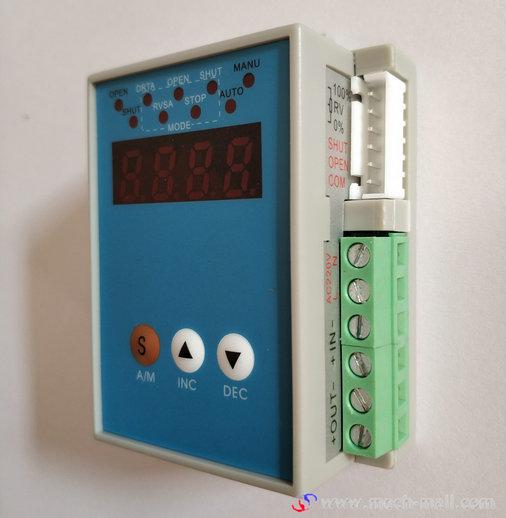
LED Windows |
Switch by pressing the button to display the valve actual opening value, setting opening value, positioner shell temperature and setting parameters |
| Status indication |
2 |
OPEN |
Output control “open”, relay closed |
| 3 |
SHUT |
Output control “shut”, relay closed |
| 4 |
MANU |
Manual state |
| 5 |
AUTO |
Automatic state |
| Mode indication (MODE) |
6 |
DRTA |
Positive action mode. 4mA – full position (fully open) ; 20mA – zero position (fully closed) |
| 7 |
RVSA |
Reverse action mode. 4mA – zero position (fully closed) ; 20mA – full position (fully open) |
| 8 |
OPEN |
The input signal interrupt mode is “on”, which makes the actuator open to the large opening limit. |
| 9 |
STOP |
The input signal interrupt mode is “stop”, which makes the actuator stops at the current position |
| 10 |
SHUT |
The input signal interrupt mode is “closed”, which makes the actuator open to the small opening limit. |
| Button |
11 |
A/M |
Manual/automatic switch key, parameter entry modification and switch key |
| 12 |
▲ |
Value increase key is also used to switch and display the valve position setting opening value in the automatic state, and it is “on” in the manual state. |
| 13 |
▼ |
Value reduction key, is also used to switch and display the temperature inside the positioner shell in the automatic state, and it is “closed” in the manual state. |